SliTaz Forum
After testing my weakiest machine (Intel Celeron M 600 MHz/ 512MB RAM), I wanted to see it roaring on my most powerful (AMD Ryzen 5 5600X/32GB RAM), and it does ;-)
Everything was recognized perfectly (report 196 sent) and worked as expected in my test from November 10 firefox-x86_64 flavor ISO, but I noticed 2 small (and weird) things:
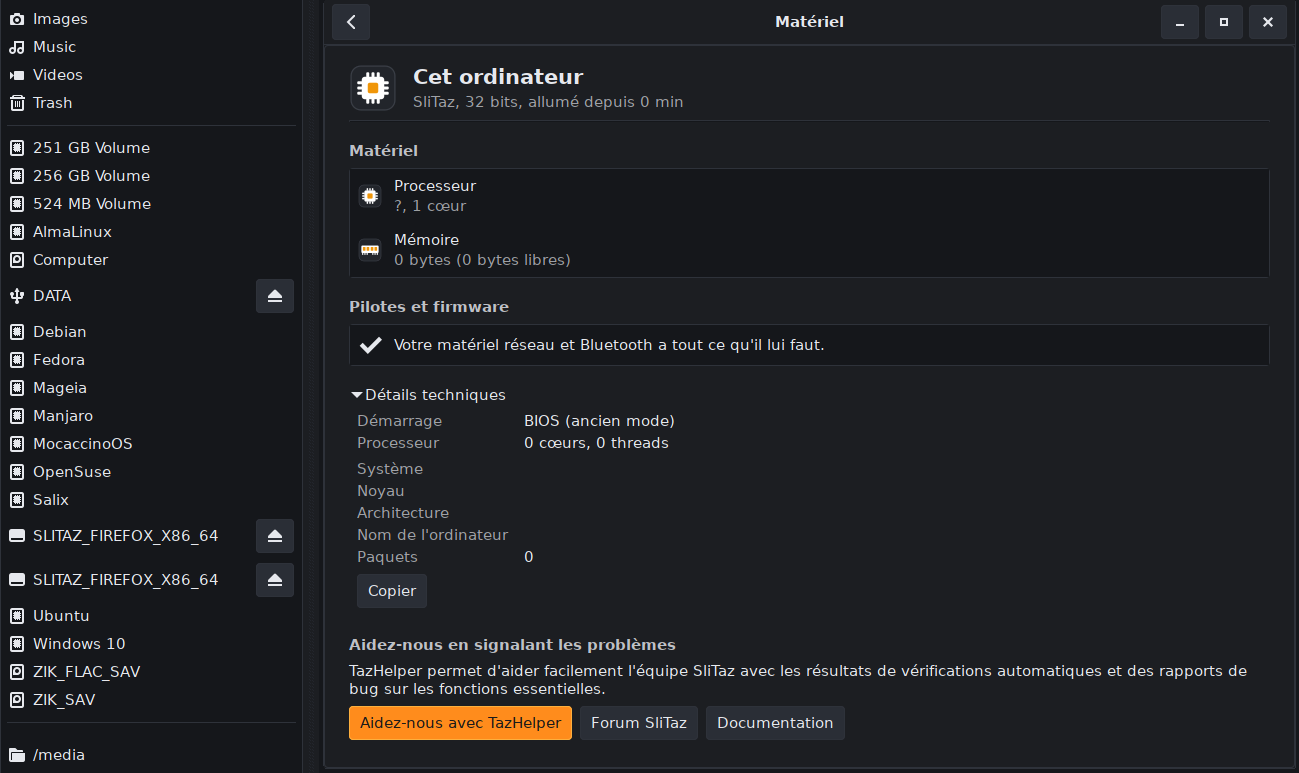
1) The hardware part of Trame-gui doesn't recognize the CPU, as seen in the message "?, 1 core", and the quantity of RAM, as it says "0 bytes (0 bytes free)".
And it also notes "SliTaz 32 bits", even when the ISO is the 64 bits version, as seen in the picture attached.
I checked back with the same ISO on my Dell Latitude D630 (which has a 64 bits Intel Core 2 Duo T7250 - Report 190), and it was exactly the same!
2) The time part of Trame-gui really loves the UNIX Epoch ;-)
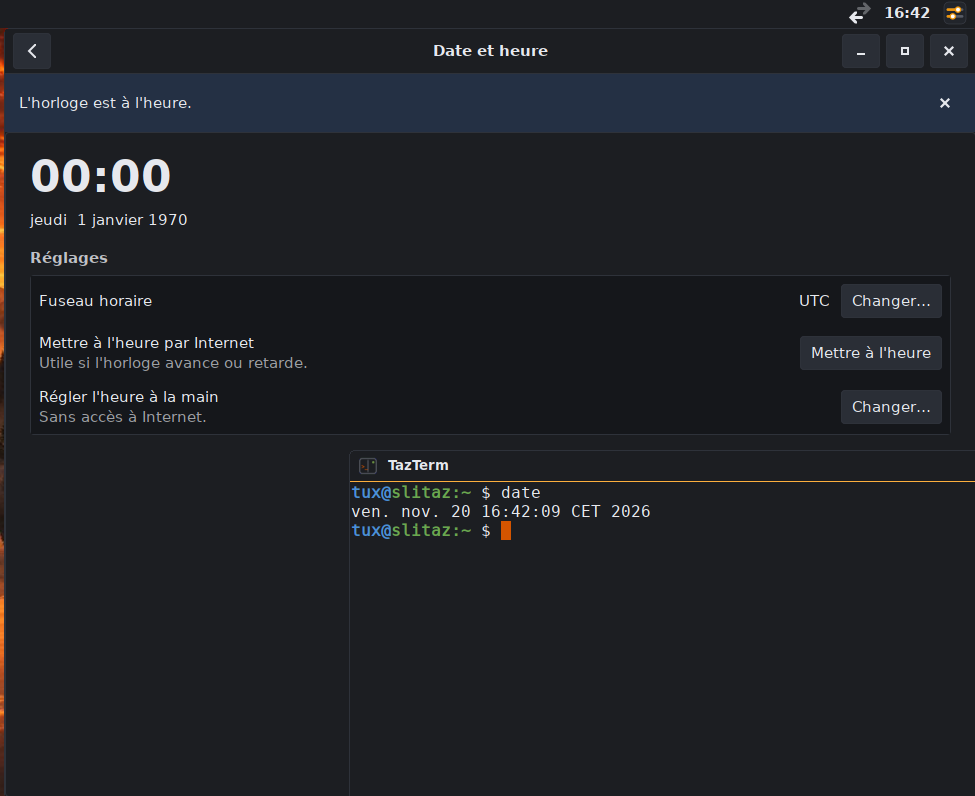
It shows midnight the 1st of January 1970, even if the system time, the LXTaz time applet and the command "date" show the correct time.
Setting the time with NTP doesn't change it (even if it works), and if you click on "manual setting", that again shows midnight the 1st of January 1970 as default (in number this time, of course).
Picture attached (forgot the manual setting), tested the same on my AMD Ryzen 5 desktop and Dell laptop too.
Everything was recognized perfectly (report 196 sent) and worked as expected in my test from November 10 firefox-x86_64 flavor ISO, but I noticed 2 small (and weird) things:
1) The hardware part of Trame-gui doesn't recognize the CPU, as seen in the message "?, 1 core", and the quantity of RAM, as it says "0 bytes (0 bytes free)".
And it also notes "SliTaz 32 bits", even when the ISO is the 64 bits version, as seen in the picture attached.
I checked back with the same ISO on my Dell Latitude D630 (which has a 64 bits Intel Core 2 Duo T7250 - Report 190), and it was exactly the same!
2) The time part of Trame-gui really loves the UNIX Epoch ;-)
It shows midnight the 1st of January 1970, even if the system time, the LXTaz time applet and the command "date" show the correct time.
Setting the time with NTP doesn't change it (even if it works), and if you click on "manual setting", that again shows midnight the 1st of January 1970 as default (in number this time, of course).
Picture attached (forgot the manual setting), tested the same on my AMD Ryzen 5 desktop and Dell laptop too.