SliTaz Forum
Hello everyone,
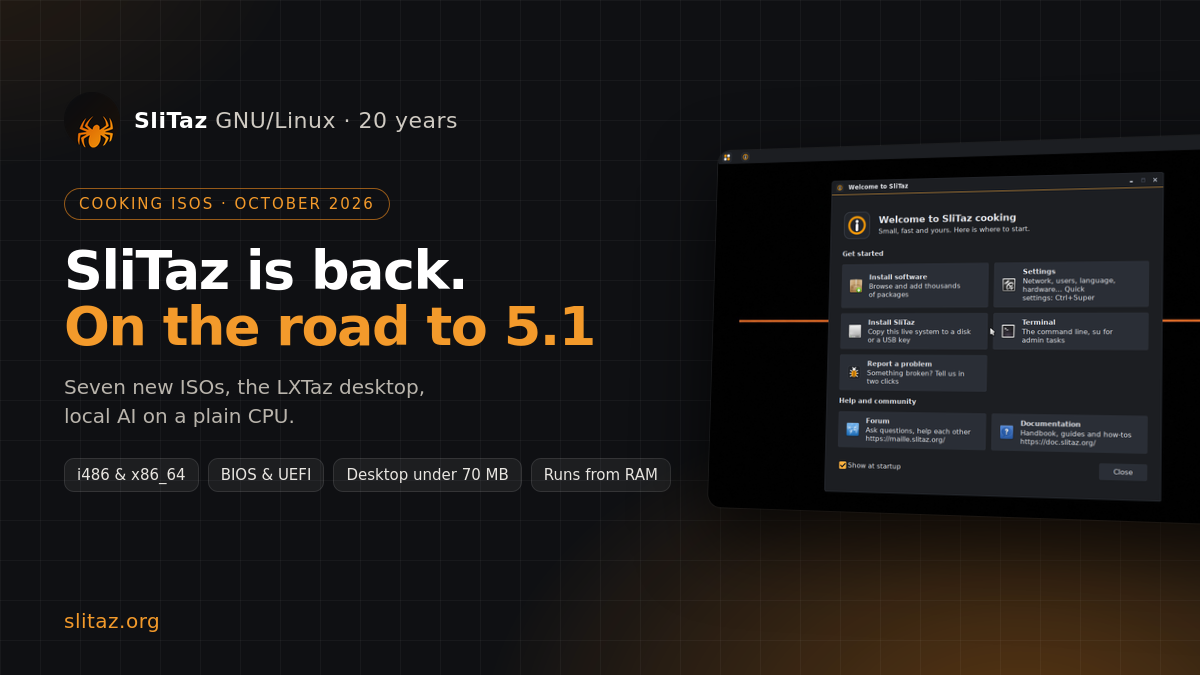
It has been a while since we published ISOs meant for everybody, and not only for the people who follow the cooking branch day after day. Today they are here: seven new cooking ISOs, tested carefully, on the road to SliTaz 5.1. A release candidate will probably follow, then SliTaz 5.1 itself, our first stable release since SliTaz 4.0 in April 2012.
SliTaz turns 20 this year. The recipe has not changed: a complete system that runs from RAM, boots in a few seconds and fits on a small USB key. What changed is everything around it: every package was rebuilt from scratch, and about 2,800 commits went into the wok since February.
The ISOs
--------
- base (i486 18 MB, x86_64 28 MB): text mode, for servers, rescue and very old machines.
- core (i486 48 MB, x86_64 66 MB): the LXTaz desktop with our installer, settings and package manager, no browser and no extra applications. Build your own system from there.
- core-retro (i486 45 MB): the same desktop on the frozen Linux 3.16 kernel, for hardware that a modern kernel no longer likes.
- firefox (i486 130 MB, x86_64 153 MB): core plus Firefox ESR and everyday applications.
All ISOs are hybrid: burn them to a CD or write them to a USB key with dd, Rufus or Etcher. The x86_64 ones boot on BIOS and UEFI. Not sure which one to take? core, 64-bit on any PC of the last fifteen years, 32-bit on older ones.
What is new
-----------
- LXTaz, our desktop: Openbox, lxpanel and the LXDE components on GTK3, plus a launcher, a quick settings menu, a dock, a file manager and a welcome window written for SliTaz.
- tazinst, the installer, now has a frugal mode: a whole USB key becomes a live SliTaz with a persistent /home.
- spk upgrades a running system atomically, glibc and the toolchain included.
- reprise repairs the distribution, offline first, and every repair can be undone. There is a "SliTaz rescue" boot entry too.
- TazHelper and filature-report turn any tester into a contributor: guided checks, and a report sent only when you click Send.
- Local AI on a plain CPU: Wove lets you talk to your system, decide answers closed questions about a text, Navette is an agentic code editor, and TazTerm, our new default terminal, is made for working with AI coding agents.
The full story is in the announcement: https://www.slitaz.org/en/news/october-2026.php
Get them, try them, tell us
---------------------------
Download: https://www.slitaz.org/en/get/
Cooking means what it says: the branch keeps moving, and your reports are what will make the release candidate and SliTaz 5.1 solid. Please try these ISOs on your own hardware, old and new, and reply here: what works, what breaks, which machine you used. For a precise bug, open its own thread with the right tags (install, hardware, packages...) so it can be marked as solved, or send it with filature-report from the desktop.
The live system logs you in automatically. If a password is asked, the accounts are tux / tux and root / root.
Known limits: no OpenGL acceleration yet, no support for the newest Wi-Fi chips (Intel BE200, Realtek rtw89, MediaTek MT7921), and an old toolchain that SliTaz 6.0 will modernize.
Thanks to Pascal, HGT, Stanislas, Paul, Erjo, Nicolae and everyone who kept SliTaz alive during the quiet years. Twenty years later, SliTaz is still small, still fast, and ready for the next twenty. Enjoy!
Christophe (pankso) and the SliTaz team
It has been a while since we published ISOs meant for everybody, and not only for the people who follow the cooking branch day after day. Today they are here: seven new cooking ISOs, tested carefully, on the road to SliTaz 5.1. A release candidate will probably follow, then SliTaz 5.1 itself, our first stable release since SliTaz 4.0 in April 2012.
SliTaz turns 20 this year. The recipe has not changed: a complete system that runs from RAM, boots in a few seconds and fits on a small USB key. What changed is everything around it: every package was rebuilt from scratch, and about 2,800 commits went into the wok since February.
The ISOs
--------
- base (i486 18 MB, x86_64 28 MB): text mode, for servers, rescue and very old machines.
- core (i486 48 MB, x86_64 66 MB): the LXTaz desktop with our installer, settings and package manager, no browser and no extra applications. Build your own system from there.
- core-retro (i486 45 MB): the same desktop on the frozen Linux 3.16 kernel, for hardware that a modern kernel no longer likes.
- firefox (i486 130 MB, x86_64 153 MB): core plus Firefox ESR and everyday applications.
All ISOs are hybrid: burn them to a CD or write them to a USB key with dd, Rufus or Etcher. The x86_64 ones boot on BIOS and UEFI. Not sure which one to take? core, 64-bit on any PC of the last fifteen years, 32-bit on older ones.
What is new
-----------
- LXTaz, our desktop: Openbox, lxpanel and the LXDE components on GTK3, plus a launcher, a quick settings menu, a dock, a file manager and a welcome window written for SliTaz.
- tazinst, the installer, now has a frugal mode: a whole USB key becomes a live SliTaz with a persistent /home.
- spk upgrades a running system atomically, glibc and the toolchain included.
- reprise repairs the distribution, offline first, and every repair can be undone. There is a "SliTaz rescue" boot entry too.
- TazHelper and filature-report turn any tester into a contributor: guided checks, and a report sent only when you click Send.
- Local AI on a plain CPU: Wove lets you talk to your system, decide answers closed questions about a text, Navette is an agentic code editor, and TazTerm, our new default terminal, is made for working with AI coding agents.
The full story is in the announcement: https://www.slitaz.org/en/news/october-2026.php
Get them, try them, tell us
---------------------------
Download: https://www.slitaz.org/en/get/
Cooking means what it says: the branch keeps moving, and your reports are what will make the release candidate and SliTaz 5.1 solid. Please try these ISOs on your own hardware, old and new, and reply here: what works, what breaks, which machine you used. For a precise bug, open its own thread with the right tags (install, hardware, packages...) so it can be marked as solved, or send it with filature-report from the desktop.
The live system logs you in automatically. If a password is asked, the accounts are tux / tux and root / root.
Known limits: no OpenGL acceleration yet, no support for the newest Wi-Fi chips (Intel BE200, Realtek rtw89, MediaTek MT7921), and an old toolchain that SliTaz 6.0 will modernize.
Thanks to Pascal, HGT, Stanislas, Paul, Erjo, Nicolae and everyone who kept SliTaz alive during the quiet years. Twenty years later, SliTaz is still small, still fast, and ready for the next twenty. Enjoy!
Christophe (pankso) and the SliTaz team